After checking your JAMB 2026 UTME result, the next big stage is the admission process through the Central Admissions Processing System (CAPS). JAMB CAPS is the official platform that handles all admissions into universities, polytechnics, colleges of education, and other tertiary institutions in Nigeria.
CAPS makes the process transparent. You can monitor your admission status in real time, see when a school offers you admission, and decide whether to accept or reject the offer.
In this guide, you will learn:
- What JAMB CAPS is and why it matters
- Step-by-step guide to access and use CAPS
- How to check your admission status
- How to accept or reject an admission offer (via portal and SMS)
- What happens after accepting
- Common mistakes to avoid
What is JAMB CAPS?
CAPS (Central Admissions Processing System) is JAMB’s automated platform introduced to replace the old manual admission system. It allows:
- Institutions to upload recommended candidates
- Candidates to see offers in real time
- Candidates to accept or reject offers
It gives you full control and transparency. Once you accept an offer, you will no longer be considered for other institutions unless you reject it.
Step-by-Step Guide to Access JAMB CAPS 2026
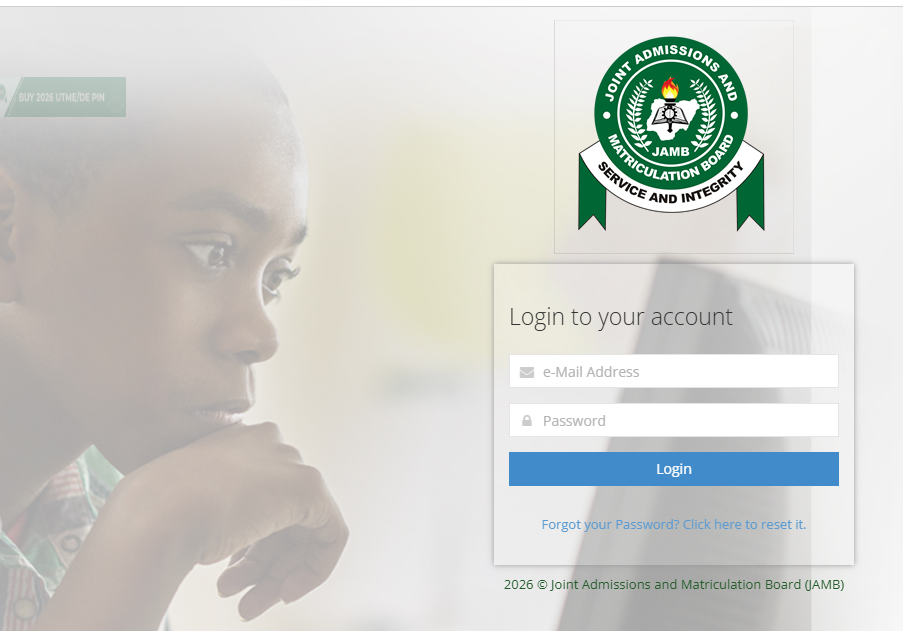
Step 1: Log into the JAMB e-Facility Portal
- Visit the official JAMB e-Facility portal: https://efacility.jamb.gov.ng/
- Enter your registered email address and password.
- Click Login.
Tip: If you forget your password, use the “Forgot Password” option. Always log in with the details you used during JAMB registration.
Step 2: Check Your Admission Status
- On your dashboard, click “Check Admission Status”.
- Select the correct exam year (2026).
- Enter your JAMB Registration Number.
- Click Check Admission Status.
You will see one of these common statuses:
- Not Admitted — No offer yet.
- Admission in Progress (AIP) — Your application is being processed.
- Admitted / “Congratulations, you have been offered admission” — You have an offer.
- Admission Offered — Ready for you to accept or reject.
Step 3: Access Your CAPS Dashboard
- After checking status, click “Access My CAPS”.
- You will now be in the Central Admissions Processing System.
- Look under Admission Profile or Admission Status section.
How to Accept or Reject Admission Offer on JAMB CAPS
When you see an admission offer, you must take action quickly within a few weeks.
Option 1: Accept/Reject via the Portal
- In your CAPS dashboard, locate the Admission Offer.
- You will see two buttons: Accept Admission and Reject Admission.
- Read the terms carefully.
- Click Accept if you want the course and institution.
- Confirm your choice.
Option 2: Accept/Reject via SMS
- Use the same phone number linked to your JAMB profile.
- Type your JAMB Registration Number followed by a space, then ACCEPT or REJECT in capital letters.
- Example: 202612345678TY ACCEPT
- Send the SMS to 55019 or 66019.
- You need sufficient airtime (usually ₦50 or more) in your SIM card.
- Wait a few minutes to confirm the update.
What to Do After Accepting Admission
- Print Your JAMB Admission Letter
- Go back to the e-Facility portal.
- Click on Print Admission Letter (there may be a small printing fee).
- This official letter is very important for school clearance and registration.
- Proceed to the School
- Check the institution’s website for clearance requirements, screening dates, and fees.
- Prepare your documents: JAMB admission letter, JAMB result slip, O’level results, birth certificate, etc.
- Complete School Registration
- Pay acceptance and school fees as required.
- Participate in any physical screening or orientation.
Read also: Post UTME Updates 2026/2027: Latest Forms, Cut-Off Marks, and Admission News in Nigeria.
Important Warnings and Tips
- Accept only if you truly want the course — Rejecting later can be difficult.
- Do not pay anyone claiming to “help” you accept admission. Everything is done by you on the official portal or via SMS.
- Check CAPS regularly — Offers can come at any time during the admission window.
- O’Level Results Must Be Uploaded — If not uploaded on CAPS, your admission may be delayed. Verify this in your CAPS dashboard under “My O’Level Result”.
- Change of Course/Institution — If you want a different course, do it early before final admission lists are processed (costs ₦3,500).
- Deadline — Candidates usually have about 4 weeks to accept an offer. Don’t delay.
Common Statuses You May See on JAMB CAPS
| Status | Meaning | What to Do |
|---|---|---|
| Not Admitted | No offer yet | Keep checking and consider change of institution |
| Admission in Progress | Being processed | Be patient and check often |
| Admitted / Admission Offered | Offer received | Accept or Reject immediately |
| Accepted | You have accepted the offer | Print letter and proceed to school |
FAQs on JAMB CAPS 2026 Admission Process
Can I accept admission via SMS only?
Yes, the SMS method (ACCEPT or REJECT to 55019/66019) is now supported and convenient. Confirm on the portal afterward.
What if I reject an offer?
You can still be considered for other institutions or courses, but it depends on available slots.
How long does it take for admission to reflect?
It varies. Some get offers within weeks, others later in the admission cycle. Keep checking.
Do I need to pay to accept admission on CAPS?
No. Accepting or rejecting is free. Only printing the admission letter attracts a fee.
What if my status is stuck on “Admission in Progress”?
This is normal during processing. Ensure your O’level is uploaded and continue checking.
Conclusion
JAMB CAPS 2026 puts you in control of your admission journey. By following the steps above, you will know how to use JAMB CAPS. If you have any questions, please feel free to use the comment section.
If you know this article is helpful, please share it with your friends who are waiting for admission.
You may also like to read:
- How to Check JAMB 2026 Result & What to Do If You Score Low
- JAMB 2026 Subject Combinations for Popular Courses
- How to Score 280+ in JAMB 2026: Proven Study Timetable, Tips & Resources

My name is Abdulrazaq Yahaya, also known as Razach. I studied Electrical and Electronic Engineering at the Federal Polytechnic Idah, Kogi State.
I created this blog, Razach Telecoms, to share helpful and practical guides on admissions, scholarships, and job opportunities. These are the exact resources I struggled to find when I needed them the most. My goal is to make the process easier for students and young professionals by providing the information I wish I had during my own journey.